> ## Documentation Index
> Fetch the complete documentation index at: https://blockscout-vb-token-total-supply.mintlify.site/llms.txt
> Use this file to discover all available pages before exploring further.
# Link to Blockscout
> Swap Etherscan and other block explorer links for Blockscout URLs across transactions, blocks, addresses, and tokens with simple URL replacement.
## Replace the primary explorer link
In most cases simply replacing the first part of the url is all that is needed to replace Etherscan with Blockscout.
For example, replace [https://etherscan.io/](https://etherscan.io/) with [https://eth.blockscout.com/](https://eth.blockscout.com/) in your code and the corresponding links to blocks, transactions, etc. will be mapped to Blockscout rather than Etherscan.
😢 Tx before replacement
[https://etherscan.io/tx/0x3e8c3aad50b2f8471400e3fe6b812f20c332846064dff8c25fadf783eefa68df](https://etherscan.io/tx/0x3e8c3aad50b2f8471400e3fe6b812f20c332846064dff8c25fadf783eefa68df)
😁 Tx after replacement
[https://eth.blockscout.com/tx/0x3e8c3aad50b2f8471400e3fe6b812f20c332846064dff8c25fadf783eefa68df](https://eth.blockscout.com/tx/0x3e8c3aad50b2f8471400e3fe6b812f20c332846064dff8c25fadf783eefa68df)
Blockscout linking architecture follows [EIP-3091](https://eips.ethereum.org/EIPS/eip-3091) standardization for the following routes:
* Blocks `/block/`
* Transactions `/tx/`
* Accounts `/address/`
* Tokens `/token/`
### UTM tags
We encourage adding UTM tags with your project information to Blockscout links. This helps us track referrals and improve our overall performance via metrics. Simply append `?utm_source=` to the end of any links pointing to Blockscout. For example, [https://eth.blockscout.com/?utm\_source=tenderly](https://eth.blockscout.com/?utm_source=tenderly).
### Common chain replacements
Replace the Etherscan url in your code with the Blockscout url for a seamless transition. All chains supported by Etherscan are also supported by Blockscout (along with many additional Blockscout chains). Some examples are below. For additional Blockscout chains see the [chains and projects](https://www.blockscout.com/chains-and-projects) page or the [chainscout json file which includes chainids](https://github.com/blockscout/chainscout/blob/main/data/chains.json).
| Chain | Etherscan ❌ | Blockscout ✅ |
| ---------------- | -------------------------------------------------------------------------------- | ------------------------------------------------------------------------------------ |
| Ethereum | [https://etherscan.io/](https://etherscan.io/) | [https://eth.blockscout.com/](https://eth.blockscout.com/) |
| Ethereum Sepolia | [https://sepolia.etherscan.io/](https://sepolia.etherscan.io/) | [https://eth-sepolia.blockscout.com/](https://eth-sepolia.blockscout.com/) |
| Optimism | [https://optimistic.etherscan.io/](https://optimistic.etherscan.io/) | [https://optimism.blockscout.com/](https://optimism.blockscout.com/) |
| Optimism Sepolia | [https://sepolia-optimism.etherscan.io/](https://sepolia-optimism.etherscan.io/) | [https://optimism-sepolia.blockscout.com/](https://optimism-sepolia.blockscout.com/) |
| Base | [https://basescan.org/](https://basescan.org/) | [https://base.blockscout.com/](https://base.blockscout.com/) |
| Base Sepolia | [https://sepolia.basescan.org/](https://sepolia.basescan.org/) | [https://base-sepolia.blockscout.com/](https://base-sepolia.blockscout.com/) |
| Arbitrum | [https://arbiscan.io/](https://arbiscan.io/) | [https://arbitrum.blockscout.com/](https://arbitrum.blockscout.com/) |
| Arbitrum Sepolia | [https://sepolia.arbiscan.io/](https://sepolia.arbiscan.io/) | [https://arbitrum-sepolia.blockscout.com/](https://arbitrum-sepolia.blockscout.com/) |
| Polygon | [https://polygonscan.com/](https://polygonscan.com/) | [https://polygon.blockscout.com/](https://polygon.blockscout.com/) |
| Gnosis | [https://gnosisscan.io/](https://gnosisscan.io/) | [https://gnosis.blockscout.com/](https://gnosis.blockscout.com/) |
| Celo | [https://celoscan.io/](https://celoscan.io/) | [https://celo.blockscout.com/](https://celo.blockscout.com/) |
| Unichain | [https://uniscan.xyz/](https://uniscan.xyz/) | [https://unichain.blockscout.com/](https://unichain.blockscout.com/) |
### Exceptions
Some newer operations without standards are still handled differently by different explorers. For example:
* Blobs on Blockscout are accessed in different ways depending on the route. For example via the `?tab=blob_txs` query string following a block ([https://eth.blockscout.com/block/20822532?tab=blob\_txs](https://eth.blockscout.com/block/20822532?tab=blob_txs)) or the `?tab=blobs` query string following a transaction. Blobs on Etherscan are accessed via `#blobinfo` query string following a block (i.e. [https://etherscan.io/block/20822532#blobinfo](https://etherscan.io/block/20822532#blobinfo)).
* User Operations (EIP-4337) are displayed on Blockscout via the [https://eth.blockscout.com/ops](https://eth.blockscout.com/ops) url. On Etherscan there is currently no defined route, but User Operations can be viewed with the `Handle Ops` filter applied to the sender's address (i.e. [https://etherscan.io/advanced-filter?fadd=0x20e9695f25413f14e5807b530D0698bd4F155074\&mtd=0x1fad948c\~Handle+Ops\&ps=10\&p=8](https://etherscan.io/advanced-filter?fadd=0x20e9695f25413f14e5807b530D0698bd4F155074\&mtd=0x1fad948c~Handle+Ops\&ps=10\&p=8))
## Replace the API link
Per-instance API endpoints (e.g. `eth.blockscout.com/api`) are deprecated. Use the Blockscout PRO API instead: one key covers every Blockscout-supported chain. Get a free key at [dev.blockscout.com](https://dev.blockscout.com/).
Etherscan uses a subdomain link for api access. For example, for the Ethereum explorer the api link is [https://api.etherscan.io/](https://api.etherscan.io/) followed by your query, or for Optimism it is [https://api-optimistic.etherscan.io/](https://api-optimistic.etherscan.io/) followed by your query.
**To replace, use the PRO API base URL with the target chain's `chain_id`**, swapping Etherscan's `chainid` parameter for Blockscout's `chain_id`:
😢 Etherscan call
[https://api.etherscan.io/v2/api?chainid=1\&module=account\&action=balance\&address=0xde0b295669a9fd93d5f28d9ec85e40f4cb697bae\&tag=latest\&apikey=YourApiKeyToken](https://api.etherscan.io/v2/api?chainid=1\&module=account\&action=balance\&address=0xde0b295669a9fd93d5f28d9ec85e40f4cb697bae\&tag=latest\&apikey=YourApiKeyToken)
😁 Blockscout PRO API call
[https://api.blockscout.com/v2/api?chain\_id=1\&module=account\&action=balance\&address=0xde0b295669a9fd93d5f28d9ec85e40f4cb697bae\&tag=latest\&apikey=YOUR\_PRO\_API\_KEY](https://api.blockscout.com/v2/api?chain_id=1\&module=account\&action=balance\&address=0xde0b295669a9fd93d5f28d9ec85e40f4cb697bae\&tag=latest\&apikey=YOUR_PRO_API_KEY)
Unlike the old per-instance route, the PRO API requires a real key on every tier, including the free tier. Get one at [dev.blockscout.com](https://dev.blockscout.com/) before making requests.
Standard API routes on Etherscan work for your queries on Blockscout. We've structured our data calls to be consistent with Etherscan whenever possible. Swap `chain_id` to move between chains, for example `chain_id=8453` for Base or `chain_id=10` for Optimism. You can see supported calls in the [PRO API reference](/devs/pro-api-responses-and-routes).
If you require more varied or richer datasets consider replacing your JSON RPC calls with the [REST API from Blockscout](/devs/apis/rest). This free API features additional metadata, stats data, human readable transactions and more.
### API Exceptions
* Blockscout does not currently support most [Etherscan API PRO](https://docs.etherscan.io/api-pro/etherscan-api-pro) queries.
* Rate limits scale with your PRO API plan. See the [PRO API overview](/devs/pro-api) for plan details and credit costs.
## Replace your wallet block explorer link
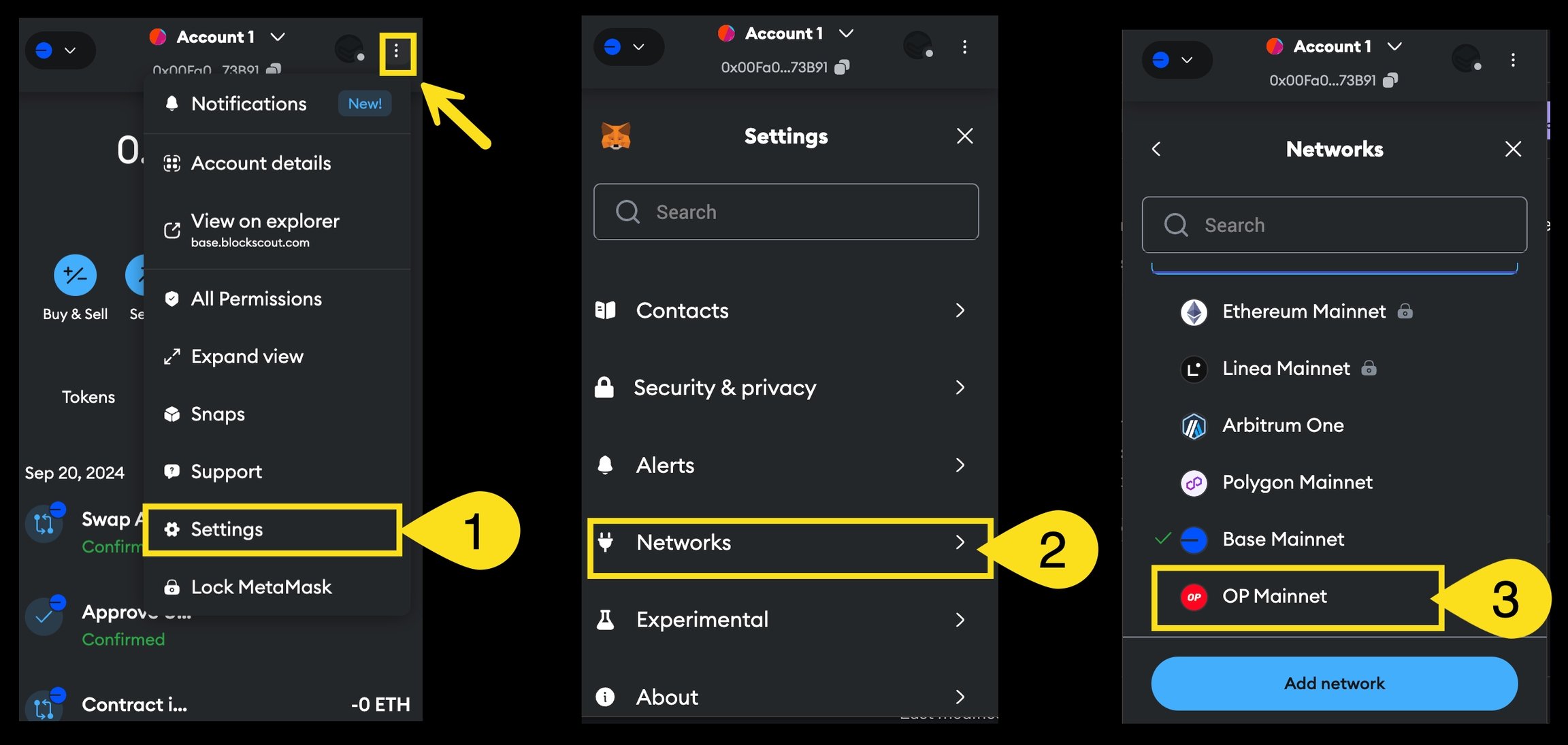
Every wallet handles the explorer link differently, but typically wallets ship with Etherscan links by default. To change, simply go to settings and replace the Etherscan link with the Blockscout one. Here's how you do it in MetaMask.
1. Open MetaMask, click the dots to open the menu, and select Settings
2. Select Networks
3. Select the network where you want to change the explorer link
 4. Find the block explorer url (i.e. [https://optimistic.etherscan.io/](https://optimistic.etherscan.io/)).
5. Change the url to Blockscout (i.e. [https://optimism.blockscout.com/](https://optimism.blockscout.com/)) and Save.
4. Find the block explorer url (i.e. [https://optimistic.etherscan.io/](https://optimistic.etherscan.io/)).
5. Change the url to Blockscout (i.e. [https://optimism.blockscout.com/](https://optimism.blockscout.com/)) and Save.
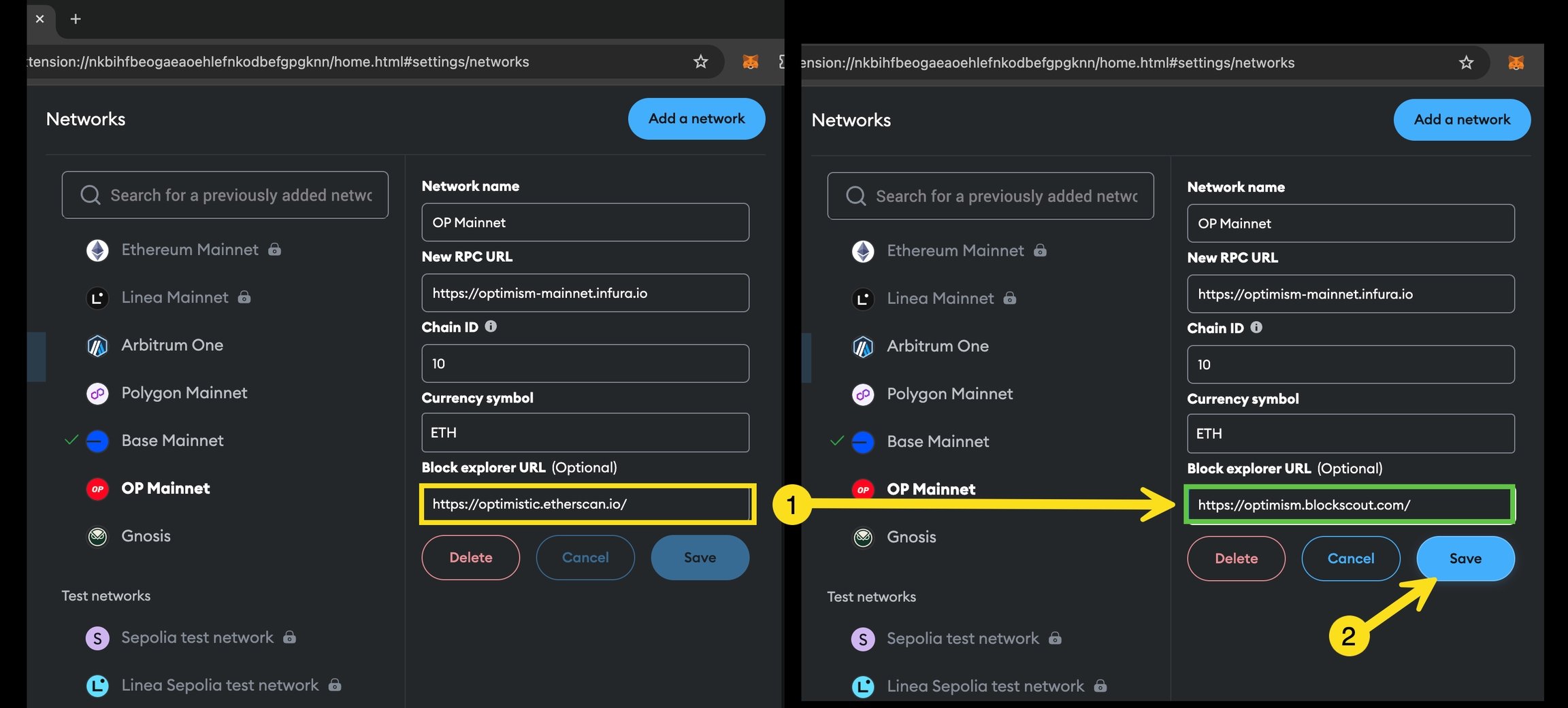 Repeat this process for all networks from the Networks screen.